
Take Photo
Use a site photo from your phone or one the homeowner already sent.
Create an AI before-and-after, add your measured scope and prices, then send one live branded link. Built for UK installers quoting resin, block paving, tarmac and slabs.
The workflow
Use a site photo from your phone or one the homeowner already sent.
Mark the driveway area to guide the image edit. Tracing is not a measurement tool: use checked site dimensions for pricing.
Choose the surface and finish, generate a concept, then review it against the brief and real material samples.
Add your area, rates, preparation, edging, extras and applicable VAT. Check the scope and total before sharing.
Share the estimate and see when the customer opens the proposal.
The finished customer experience
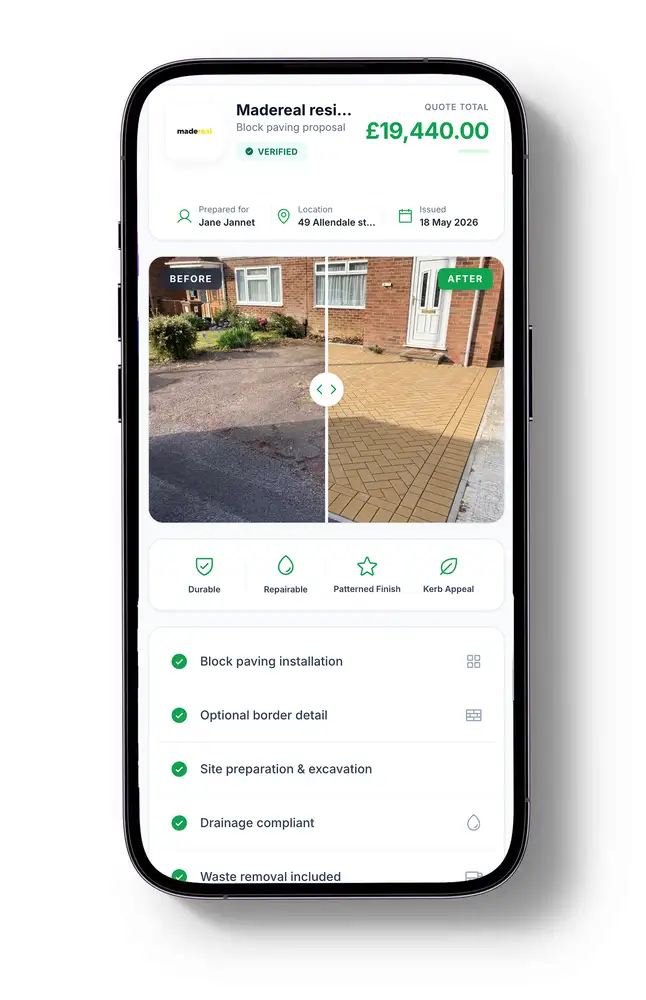
The customer opens a mobile-friendly proposal with your branding, site details, before-and-after comparison, itemised scope and price. There is no PDF to download, app to install or customer account to create.
Revise the saved proposal from your workspace and the same customer link updates. Customers can request changes, and you can check proposal opens before following up. An open is a useful signal—not proof that the customer has accepted the quote.
Explore finish and border ideas on a site photo, then confirm the product selection with real samples and the written specification.
Explore the resin driveway visualiser →Use your own measurements and rates in the free calculator for an itemised working breakdown before building a visual proposal.
Use the free driveway quote calculator →An estimate is your pricing calculation; the visual proposal is the live page used to present it. Review scope, assumptions, price and terms before issuing a quote. AI images are illustrative concepts, not technical designs or guarantees of the installed finish.