
Driveway Visualiser Sign in
Built for UK driveway installers

Win more driveway jobs.

Upload a customer’s driveway photo. Show them how it could look, with the price, in one simple estimate. Upload a customer’s driveway photo. Show them how it could look, with the price, in one simple estimate.

View a sample estimate

Start with a driveway photo. No sign-in needed.

Open the app without a photo

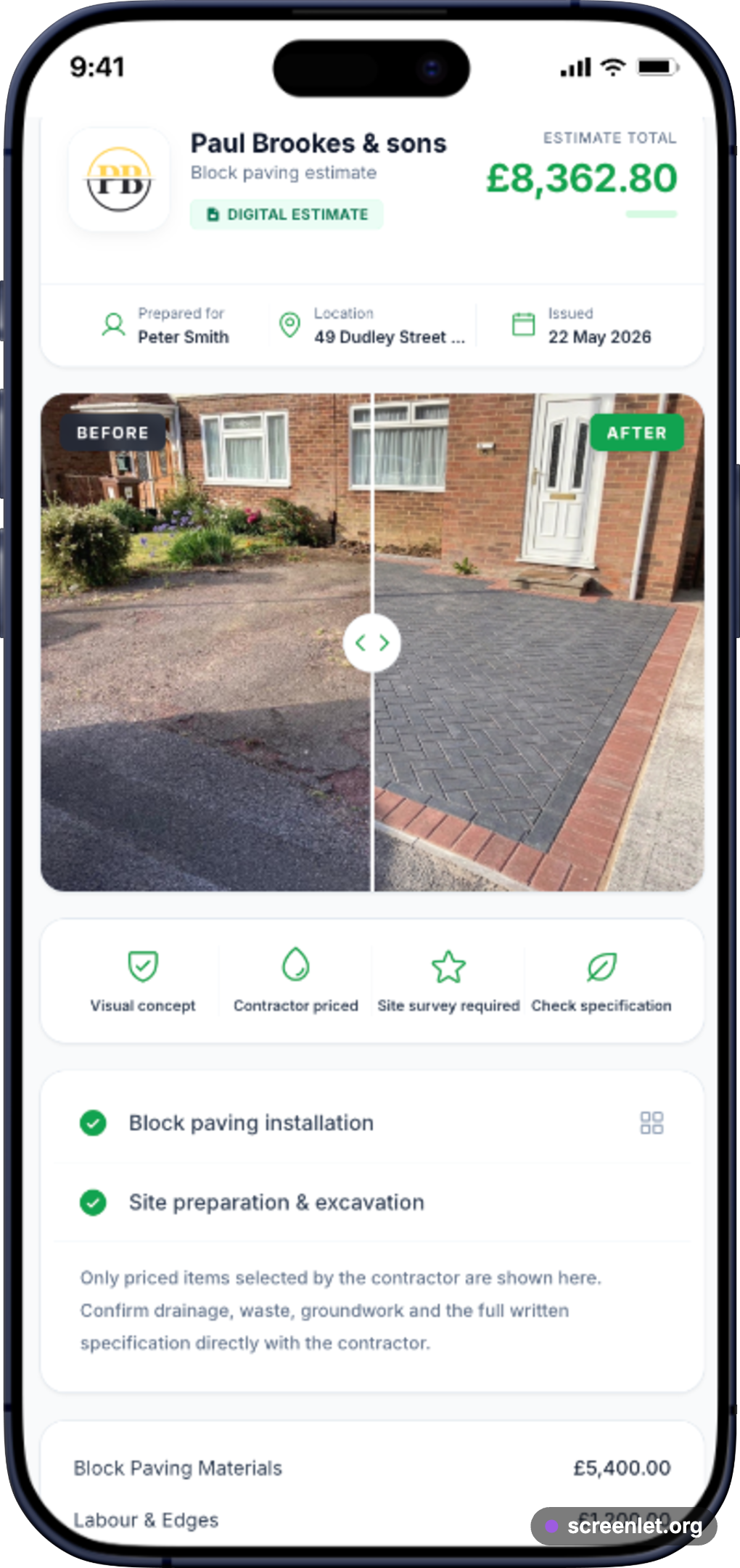
Full customer driveway estimate shown on a phone, including the before-and-after visual, work and price
The complete visual estimate an installer can send to a customer.

THE ESTIMATE YOUR CUSTOMER SEES

One link. Everything they need.

They see the new driveway, the work included and the price—all on their phone.

See the complete workflow

From site photo to customer-ready estimate.

This 33-second walkthrough shows the real workflow: upload a driveway photo, generate an AI before-and-after visual, price the job, and send the customer a live estimate link.

Visualise

Show resin, paving or tarmac options before the client commits.

Estimate

Build an itemised driveway estimate with rates, extras and VAT.

Follow up

Send a branded link and know when the customer opens it.

Driveway Visualiser promo video: AI visuals, itemised estimates and customer estimate links.

Survey. Visualise. Price. Send. Follow up.

1

Take Photo

Take a picture while estimating, or use one the client texted you.

2

Trace Edge

Tap around the old driveway to mask out where the new surface goes.

3

AI Render

Select resin, block paving or tarmac. The AI generates a visual concept for review.

4

Price It

Add your meterage, materials and tax rates. The app calculates an itemised estimate for you to check.

5

Send Link

Copy the customer link and send it by your usual channel. Open tracking gives you a useful follow-up signal.

Try it out

Tracing the driveway is as easy as tapping your screen.

No Photoshop workflow is required. Tap around the edges of the old driveway to guide which area the AI should change, then review the result.

Designed for tablets and phones
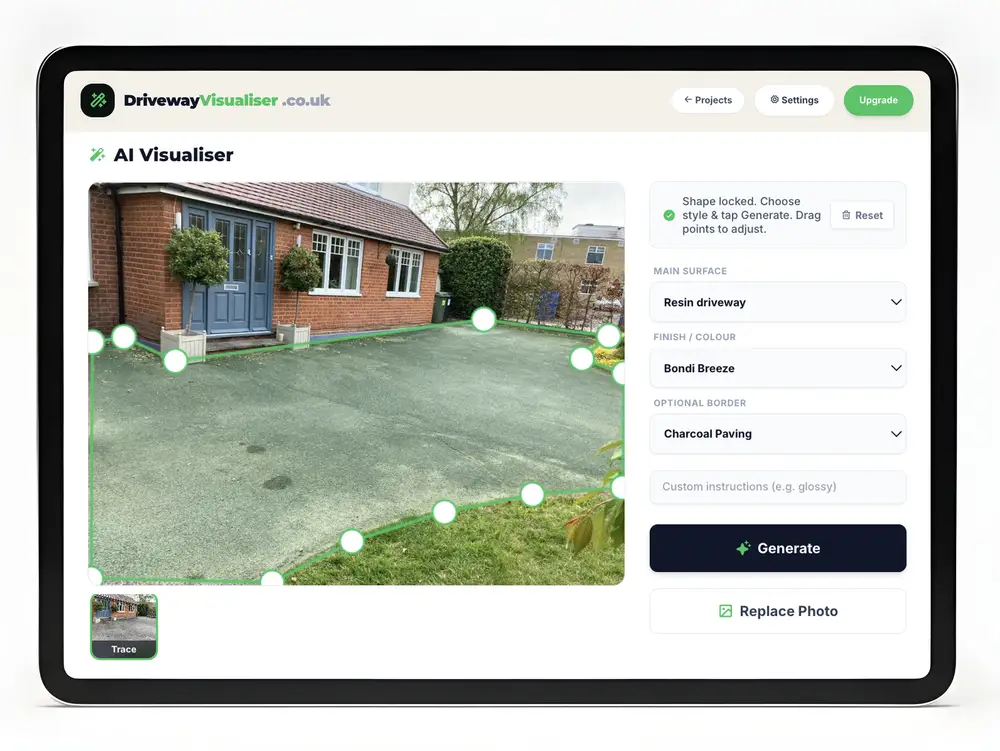
Connect the dots to define the area
Tap points. Tap green dot to close.

The App

Everything you need to estimate and manage jobs on the go.

Simple, fast, and works on whatever device you have with you.

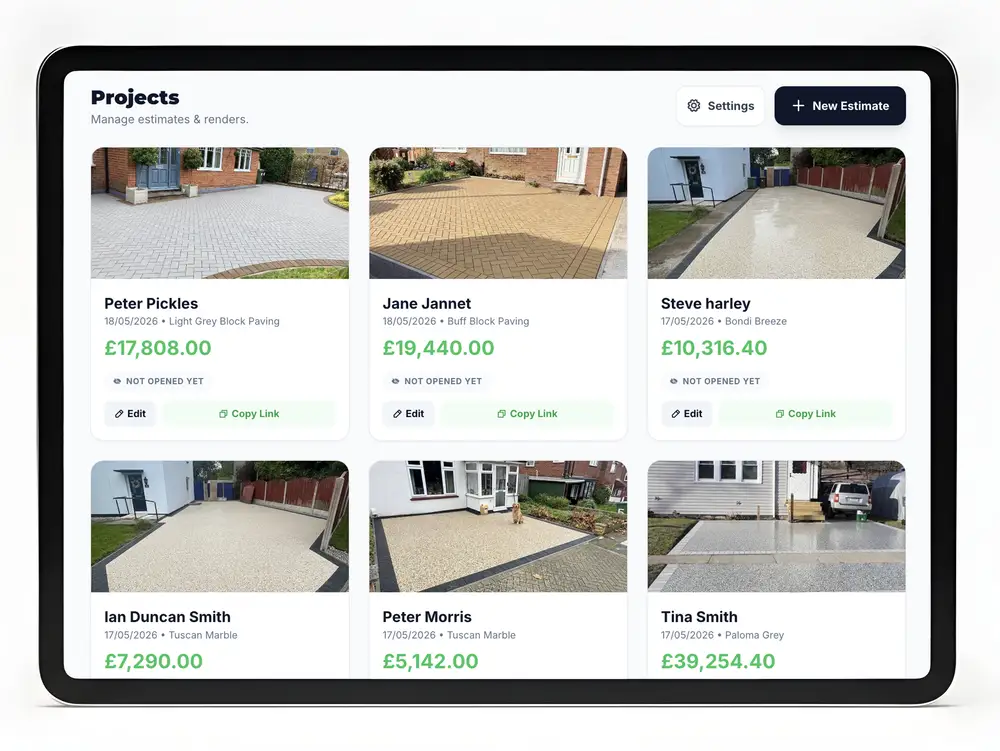
All your projects in one place.

Keep saved estimates, generated concepts and client details in a project archive you can open from the office or on the road.

iPad Project preview
iPad trace preview

Tracing tells the AI which area you want to change.

Tap around the edges of the existing driveway on your screen. The traced mask guides the AI, and you can review the generated concept before sharing it.

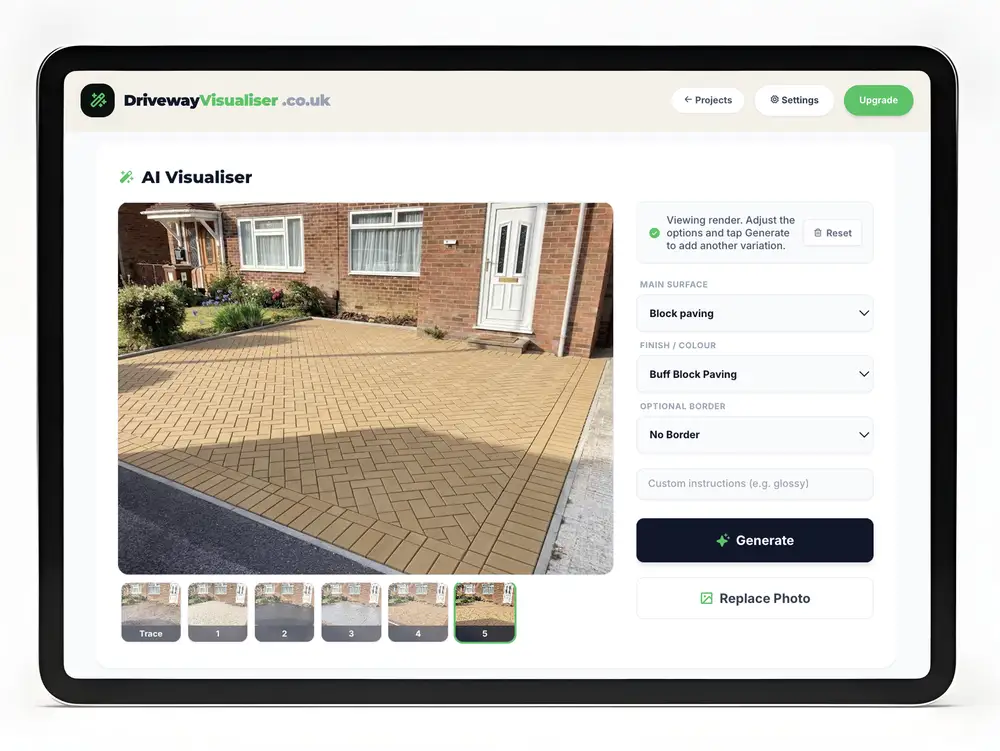
Multiple generations per project.

Not sure if the client prefers resin or block paving? Generate variations on the same photo so the customer can compare options alongside samples and specifications.

iPad Generation preview

Smart Tax & Quoting

Built-in calculators let you add materials, labor, and toggle tax rates. Send a professional, itemised breakdown to the client that updates dynamically.

Cloud Project Archive

Signed-in users can keep estimates, generated concepts and client details together, then reopen saved projects from another device.

Know When to Call

Your dashboard records when a customer opens an estimate, giving you a useful signal for quote follow-up.

Pricing

Start free. Upgrade when your quote archive starts paying for itself.

Free Access

Start with 15 free generations and up to three active projects. Create an account when you are ready to protect your estimates and reopen them on another device.

£0

  • 15 free generations
  • Up to 3 active projects
  • Save estimates with a free account
  • Client estimate links
Create a visual quote

Founding installer price

Solo

For one owner/operator or sales rep.

£29/mo

  • Up to 500 saved projects
  • Send live estimate links
  • Track when clients open estimates
  • Cloud project archive
Buy Solo

Team pilot

A managed pilot for companies that want to help shape team workflows.

£79/mo

Managed pilot; approved teams only.

  • Pilot scope agreed with each company
  • Team invites are not self-serve yet
  • Current Solo workflow for pilot users
  • Direct product feedback channel
Ask about the pilot

FAQ

Questions contractors ask before trying it.

Is this only for resin driveways?

No. It works for resin bound, block paving, tarmac, flagging and mixed driveway estimates where a visual helps the customer decide.

Can I use it on site?

Yes. It is web-based, so you can start from a phone photo during the survey and continue the estimate from a tablet or desktop later.

Does it replace my estimating process?

It supports it. You still control materials, quantities, extras, VAT and pricing, while the customer receives a clearer live proposal rather than relying on a static PDF.

Why does open tracking matter?

An estimate opened today is easier to chase than one buried in yesterday's messages. The dashboard records opens so you can follow up while the quote is still fresh.

Your next estimate could look like this.

Take the photo, show the finish, send the branded estimate, and know when the customer opens it. Start free today.

Create a visual quote